 Set-Management
|
<< Click to Display Table of Contents >> Navigation: Software Description > Software Functions > Master Data >
|
Definition "Set
A set is a gemstone box that contains several stones of different qualities. Thus, a set would actually be a "container".
However, since unlike a container, a set can be sold as a whole and thus can have a price that differs from the sum of its parts, a set must be considered a special form of an item.
For example, a pampel shape suitable for a pendant and two mirror-symmetrical stones for an ear-pendant pair.
Set types
a) Simple sets (pseudo-sets)
usually consist of several simple stones, which because of their simplicity are not sold separately from the set, but only as a whole set.
Thus, simple sets cannot be created as a set but only as an item (mixed lots).
b) Quantity stone sets (mixed sets)
contain both high quality (qualified) single stones and a number of simple stones, which can be added to the set as a mixed lot.
Since the high value stones as well as the lot have been added to the set as items, both the individual high value stones and the lot can be sold out of the set
Example:
Figure |
Description |
Comment |
|
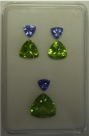
Set consisting of 3 stone articles
- 3 x tanzanite - Quantity item - 2 peridot (small) - Quantity item - 1 peridot (bigger) - single stone |
|
|
|
|
|
|
|
|
c) Individual stone sets (high quality sets).
Contain only high quality classified single stones that can all be sold as individual units from the set.
Creating a set
1. first a set is created in the set management. Set set can be regarded as a container for the stones that will be added to it. Any code can be assigned to the set, which should be so meaningful (mnemonic code) that the content of the set can be inferred from the code.
2a. Then all stones of a set are created as single articles and assigned to the already created set.
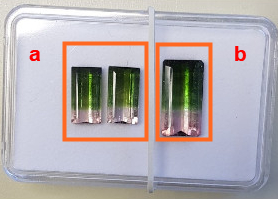
In the example above, the two small stones (a) are created as one item, as well as the large stone (b) as the second article.
Print labels for the stone articles. Do not glue the label, but cut it on a backing and put it into the set box.
2b. If the stones to be assigned to the set have already been created as stone articles when the set was created, they can also be assigned to the set in the set administration.
3. after assigning the stones to the set, when you call up the set in the set management, you will see all the stones assigned to it.
4. the set can have its own price (e.g. the set can be more expensive than the sum of its bricks)
5. print the set label and stick it on the box.
6. the set can also be assigned to a drawer
7. stones can be taken from a set at will and also new stones can be added to an existing set.
Changing a set
Stones can be removed from a set at any time or, after removal, the removed stone can be replaced by another one to preserve the set.
Canceling a set
As soon as a set consists of only one stone, the set should be cancelled, if it is not completed again to a multi-part set.
The single stone that ultimately remains in the set will in any case be retained as an article in the article master even after the set has been deleted.