 Create Gem-Items (Classification)
|
<< Click to Display Table of Contents >> Navigation: Reference > Stammdaten > Gem-Items > Item-Management >
|
The unique identifier of each gem-item is the gem-code, which is derived from the classification of the stone.
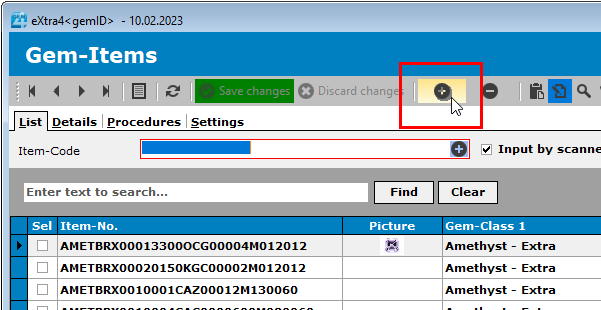
Thus, when creating a new gem-item by pressing the "+" keys or the keyboard shortcut "CTRL + N", the classification window is called up first.
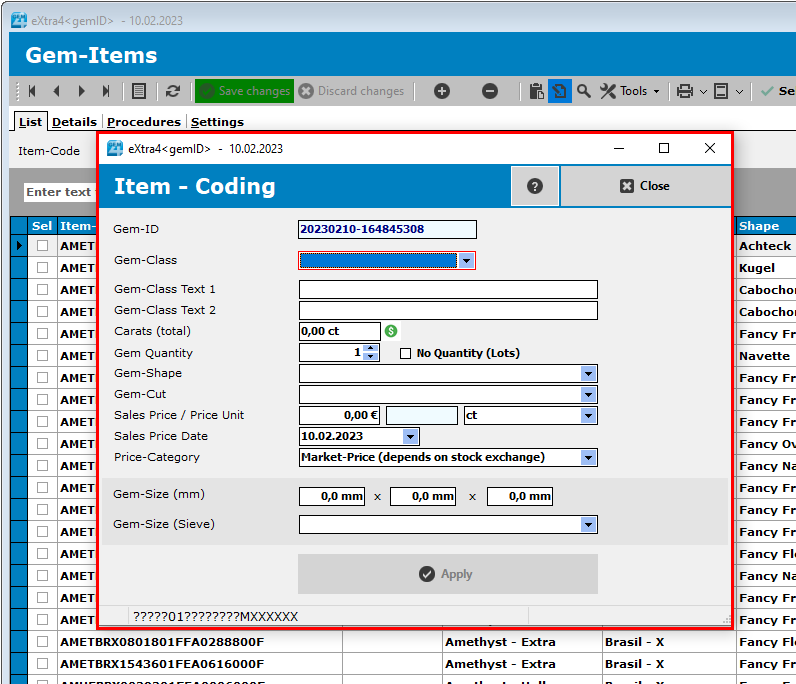
Now enter all data relevant for stone identification. With each entry, the question marks in the stone code preview of the status display are replaced by the values entered.
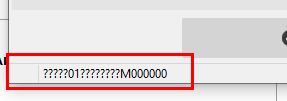
Only when all question marks have been removed is a unique article code complete and can be adopted as a new gem-item.
The data to be entered are as follows
Input |
Content |
Remarks |
Gem-Id |
This value cannot be entered and is automatically generated by the program. It is an anonymous identification code that cannot be changed. While a gem-code can change if necessary (e.g. by looping around), this value always remains unchanged.
|
The gem-id represents the date and time (in milliseconds) of the stone's creation. |
Gem-Class |
Is selected from the stored gem-classes.
|
|
Gem-Class Text 1/2 |
Werden bei Auswahl der Steinklasse automatisch erzeugt, können an dieser Stelle aber ggf. ergänzt oder geändert werden.
|
|
Carats (total) |
Is regularly entered in carats. However, it can also be entered in grams if the price unit is changed accordingly when entering the sales price. If there are several stones in the stone box, the total weight is entered here.
|
|
Gem-Quantity |
The number of stones contained in the gem-box.
|
In Case of lots which are measured only in carats please leave the value at zero and check the "No Quantity" box.
|
No Quantity (Lots) |
This check-box is only checked if the item is a lot which will be handled only in weight (carats) and not by pieces.
|
|
Gem-Shape |
Is selected from the stored shapes.
|
|
Gem-Cut |
Is selected from the stored cuts.
|
|
Sales Price / Price Unit |
The sales price of the gem-item per price unit. When entering the price, the corresponding encryption code is immediately displayed in the blue field behind it. The price unit is preset to carat (ct) as the standard unit, but can also be adjusted to gram (gr) or unit price (pc). If the price unit is changed to "gr", the stone weight in grams must also be entered accordingly. If the price unit is changed to "pc", the stone weight must be entered in carat. The weight unit in the "Stone weight" field changes according to the selection of the price unit.
|
|
Salex Price Date |
The price date of the sales price. |
Will not be part of the gem-code
|
Price Category |
Here you can choose between the standard "Market price" and "Fixed price". While with the market price the gem price can be calculated automatically from the price tables stored in the gem classes, no price calculation is carried out with the fixed price.
|
|
Gem-Size (mm) |
If the system settings specify that the gem sizes should also be included in the gem-code, the input fields for the gem sizes appear in the classification window. a) Length (X-Axis)
b) Width (Y-Axis)
c) Thickness (Z-Axis) - not part of the gem-code
|
The largest value of the size is always selected as the length (X-axis). |
Gem-Size (Sieve) |
For Lots which come in Sieve sizes you can select the size in Sieve-categories |
As soon as a sieve-size is selected gem-sizes (mm) are reset to zero.
|
Finally press the button "Apply" to create the new gem-Item.